Exporting Scalar Values from Multi-ROIs
To continue an analysis or to archive your results, you can export the scalar values contained in a selected multi-ROI to a comma-separated values file (*.csv extension).
Dragonfly-formatted CSV files are formatted in columns as follows: | Time Step | Label Index | Name | Values Slot 1 | Values Slot 2 | Values Slot 3 | Values Slot… |.
How to Export Scalar Values from a Multi-ROI
- Do one of the following:
- Click the Export Scalar Values button in the Scalar information box on the Data Properties and Settings panel.
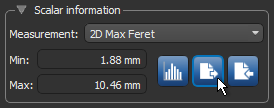
- Right-click the required multi-ROI in the Data Properties and Settings panel and then choose Export Scalar Values in the pop-up menu.
The Choose Scalar Value Slots to Export dialog appears.
- Click the Export Scalar Values button in the Scalar information box on the Data Properties and Settings panel.
- Do the following, as required:
- Choose the scalar value slots you want to export in the Slots drop-down menu.
- Check the Select all scalar values option to export all scalar value slots.
- Click OK.
- Choose a location and file name in the Select a File to Export in CSV dialog and then click Save.